Your home office should fuel your productivity, not drain it. Yet too many of us struggle with cluttered desks, tangled cables, and that sinking feeling when we can’t find an important document buried somewhere in the chaos. The space that’s supposed to be your command center becomes a source of daily frustration.
Creating an organized home office isn’t just about making things look neat. It’s about designing a system that works with your natural workflow, keeps your most-used items within arm’s reach, and eliminates the mental energy wasted on searching for things. When your environment supports your work habits instead of fighting against them, you’ll find yourself more focused and efficient throughout the day.
Let’s transform your workspace into a productivity powerhouse with smart storage solutions that actually make sense for how you work.
Understanding Your Workflow Before You Organize
Before buying a single organizer, spend a week tracking how you actually work. Notice which documents you reach for most often, where you naturally place items when you’re focused, and what disrupts your concentration. This insight will guide every storage decision you make.
Most people make the mistake of organizing based on how they think they should work rather than how they actually work. You might love the idea of filing everything alphabetically, but if you naturally think in terms of project categories, fight against your instincts and you’ll end up with a system that falls apart within weeks.
Pay attention to your dominant hand and natural reach patterns. Right-handed people typically want their most-used supplies on the right side of their desk, while left-handed folks prefer the opposite. Your phone, notepad, and primary writing tools should all live in your comfort zone.
Desk Organization That Works With Your Brain
The Zone System
Divide your desk into three zones based on frequency of use. Zone 1 includes items you need multiple times per day like your keyboard, mouse, phone, and primary notebook. Zone 2 holds things you use weekly such as staplers, tape, and reference materials. Zone 3 is for monthly items like spare batteries or backup supplies.
Keep Zone 1 completely clear except when actively using items. This reduces visual clutter and gives your brain space to think. Zone 2 items can live in desktop organizers or shallow drawers. Zone 3 belongs in deeper drawers or nearby shelving.
A bamboo desk organizer with multiple compartments works perfectly for managing your Zone 2 items while maintaining a clean aesthetic.
SimpleHouseware Mesh Desk Organizer
This multi-compartment organizer keeps frequently used supplies visible but contained.
Vertical Storage Solutions
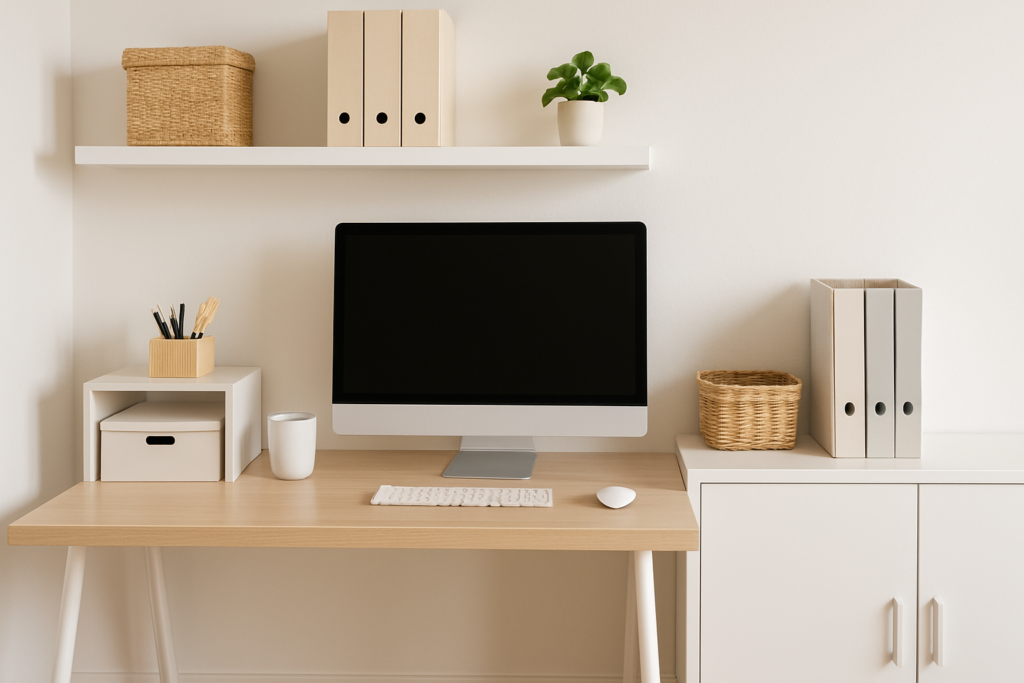
Your desk surface is prime real estate, but the space above it often goes unused. Wall-mounted shelves positioned at eye level keep reference materials visible without cluttering your workspace. Install them about 18-24 inches above your desk surface for easy access without bumping your head.
Letter trays that stack vertically handle ongoing projects better than horizontal filing. Label each tray with project names or priority levels. This system lets you see everything at a glance and prevents important papers from getting buried under new arrivals.
Consider a monitor stand with built-in storage underneath. This elevates your screen to proper ergonomic height while creating space for your keyboard when not in use, plus provides hidden storage for flat items like tablets or notebooks.
Conquering Cable Chaos
Cable management affects both aesthetics and functionality. Tangled cords under your desk create a dust-collecting mess and make it harder to clean your workspace. More importantly, they can create trip hazards and make it difficult to move equipment when needed.
Start by auditing every cable in your workspace. Unplug anything you haven’t used in the past month and store it elsewhere. For remaining cables, group them by function: power cables together, data cables together, and audio/video cables in their own group.
Use adhesive cable clips along the edge of your desk to route cables exactly where you need them. This prevents them from sliding off the back of your desk every time you unplug something. Place clips every 6-8 inches for smooth cable runs.
Under-desk cable trays keep power strips off the floor and make it easy to access outlets. Mount the tray on the underside of your desk, leaving enough clearance for your legs. This also improves airflow around electronic devices and makes vacuuming much easier.
JOTO Cable Management Tray
This under-desk tray keeps power strips accessible while hiding cable clutter completely.
For desktop cable management, a cable management box hides power adapters and excess cord length while keeping connections accessible.
Document Organization Systems That Scale
The Three-Pile Rule
Limit yourself to three piles of paper on your desk: Action Required, Waiting For Response, and To File. Any paper that doesn’t fit these categories either needs immediate action or belongs in long-term storage. This prevents the endless accumulation of “might need later” papers.
Action Required papers should never sit longer than 48 hours. Either complete the task, schedule it, or delegate it. Waiting For Response papers need weekly review to follow up on overdue items. To File papers should be processed weekly during a dedicated filing session.
Digital-Physical Integration
Create parallel organization systems for digital and physical documents. Use the same folder names and categories for both computer files and physical filing cabinets. This makes it intuitive to find information regardless of format.
Scan important documents immediately after receiving them, then decide if you need to keep the physical copy. For most documents, the digital version provides better searchability and backup security. Keep physical copies only for legal documents, contracts, or items requiring original signatures.
A desktop document scanner makes this process quick enough to do routinely rather than letting papers pile up for batch scanning sessions.
Reference Material Access
Organize reference materials by frequency of use rather than alphabetically. Keep your most-referenced items in a desktop file sorter within arm’s reach. Medium-use materials can go in a filing cabinet drawer, while archives belong in storage boxes labeled by year or project.
Use clear plastic sleeves for frequently referenced papers like password lists, contact information, or procedure checklists. This protects them from wear while keeping information visible. Avoid laminating unless absolutely necessary, as it makes updates difficult.
Sterilite 4-Drawer Desktop System
These clear drawers let you see contents instantly while keeping documents organized and dust-free.
Maximizing Small Office Spaces
Small home offices require creative thinking about every square inch. Start by measuring your space accurately and looking for unused vertical areas. The space between your desk surface and any overhead shelving can accommodate monitor arms, task lighting, or hanging organizers.
Consider furniture that serves multiple purposes. Ottoman storage cubes provide extra seating for clients while hiding supplies inside. A bookshelf can act as a room divider in shared spaces while providing storage on both sides.
Wall-mounted fold-down desks work well in multi-purpose rooms. When not in use, they fold flat against the wall, returning the space to its other function. Look for models with integrated storage for supplies that would otherwise need separate organizers.
Use the inside of closet doors for additional storage. Over-the-door organizers can hold office supplies, files, or reference materials. This works especially well for seasonal items or supplies you don’t need daily access to.
Ergonomic Storage Considerations
Proper ergonomics extends beyond your chair and monitor position. Your storage solutions should support healthy postures and movements throughout your workday. Avoid storing frequently used items in locations that require twisting, reaching overhead, or bending down repeatedly.
The optimal reach zone extends about 16 inches in front of you and 24 inches to each side when seated normally. Items you use multiple times daily should live within this zone. This includes your phone, primary writing tools, and most-referenced documents.
Drawer organizers should place small items toward the front where you can grab them without reaching deep into drawers. Reserve the back sections for longer items like rulers or items you use less frequently. This prevents the common problem of dumping drawer contents to find something small at the bottom.
Position your filing cabinet or storage drawers at a height that allows you to access them without bending at the waist. If using a traditional four-drawer filing cabinet, put your most-used files in the second drawer from the top. The top drawer is too high for comfortable repeated access, and bottom drawers require too much bending.
Lighting’s Impact on Organization
Poor lighting makes even the best organization system harder to use. You need adequate illumination to quickly identify items, read labels, and maintain your systems. Dark corners and shadowed areas become dumping grounds for items you can’t properly see or categorize.
Task lighting should illuminate your primary work surface plus any storage areas you access frequently. A desk lamp with adjustable positioning lets you direct light where you need it throughout the day. Look for LED models with adjustable color temperature to match your natural circadian rhythms.
Under-cabinet lighting transforms deep storage areas from black holes into usable space. Battery-powered LED strips are easy to install and provide focused illumination for shelving, filing cabinets, or storage closets.
Natural light affects how you perceive your space and impacts your motivation to maintain organization systems. Position your primary work area to take advantage of natural light when possible, but use window treatments to prevent glare on computer screens.
Maintenance Systems That Stick
The best organization system fails without consistent maintenance. Build organizational tasks into your daily and weekly routines rather than waiting for periodic overhauls. Spend five minutes at the end of each workday returning items to their designated homes and clearing your desk surface.
Schedule weekly sessions for filing, cable management checks, and supply inventory. This prevents small issues from becoming major reorganization projects. Set reminders on your calendar and treat these sessions as non-negotiable appointments with yourself.
Review your systems quarterly to identify what’s working and what isn’t. Be honest about whether you’re actually using storage solutions as intended. If something consistently becomes messy, the system needs adjustment rather than more willpower.
Label everything clearly, even if you think you’ll remember. Use a label maker for a professional appearance, or write labels by hand if that’s more your style. The key is making labels visible and specific enough that anyone could understand your system.
FAQ
How often should I declutter my home office?
Plan a thorough decluttering session monthly, with smaller maintenance sessions weekly. During monthly reviews, evaluate whether stored items still serve your current projects and goals. Weekly sessions should focus on returning items to their designated places and processing accumulated paperwork. This rhythm prevents clutter from building up while keeping the process manageable.
What’s the best way to organize supplies I only use occasionally?
Store occasional-use supplies in clearly labeled containers away from your primary workspace. Group similar items together and keep an inventory list posted inside storage areas. Consider using clear plastic bins so you can see contents at a glance. The key is making these items findable when needed without taking up prime workspace real estate.
How can I keep cables organized when I frequently plug and unplug devices?
Use magnetic cable holders that attach to your desk edge for frequently moved cables. Keep cable lengths slightly longer than needed to prevent tension when devices are moved. Consider a charging station for mobile devices to reduce the number of cables crossing your workspace. For permanently connected devices, use spiral cable wrap or adhesive clips to route cables cleanly along desk edges.
Should I organize my office supplies by type or by project?
Organize by type for basic supplies like pens, paper clips, and sticky notes that you use across multiple projects. Project-based organization works better for specialized materials, reference documents, and tools specific to particular types of work. Many people benefit from a hybrid approach with general supplies organized by type and project-specific materials kept together in dedicated areas or containers.
This article contains affiliate links. We may earn a small commission at no extra cost to you.